

ClickUp AI Pricing: What It Actually Costs a Month
The price on the ClickUp AI page is $9 a user. The number on your invoice is bigger, and most teams only find out which bigger after the first month runs.
Here is the whole thing in plain English, checked against ClickUp's own pages on 15 August 2026.
The short answer
ClickUp charges for AI in 3 separate ways.
What | Price | How it is charged |
|---|---|---|
Brain AI | $9 per user, per month | Every member of the Workspace |
Everything AI | $28 per user, per month | Every member of the Workspace |
AI Super Credits | $0.001 each, $10 per 10,000 | Used up by the automatic features |
All 3 sit on top of the plan price, which is $7 or $12 a user. So a Business workspace with Brain AI is $21 a person a month. With Everything AI it is $40.
A 25-person agency on Business plus Brain AI pays $525 a month. That is $6,300 a year, before a single credit is bought.
Bill one: the plan
This is the part everyone already knows. 4 plans, priced per user per month, cheaper if paid a year up front.
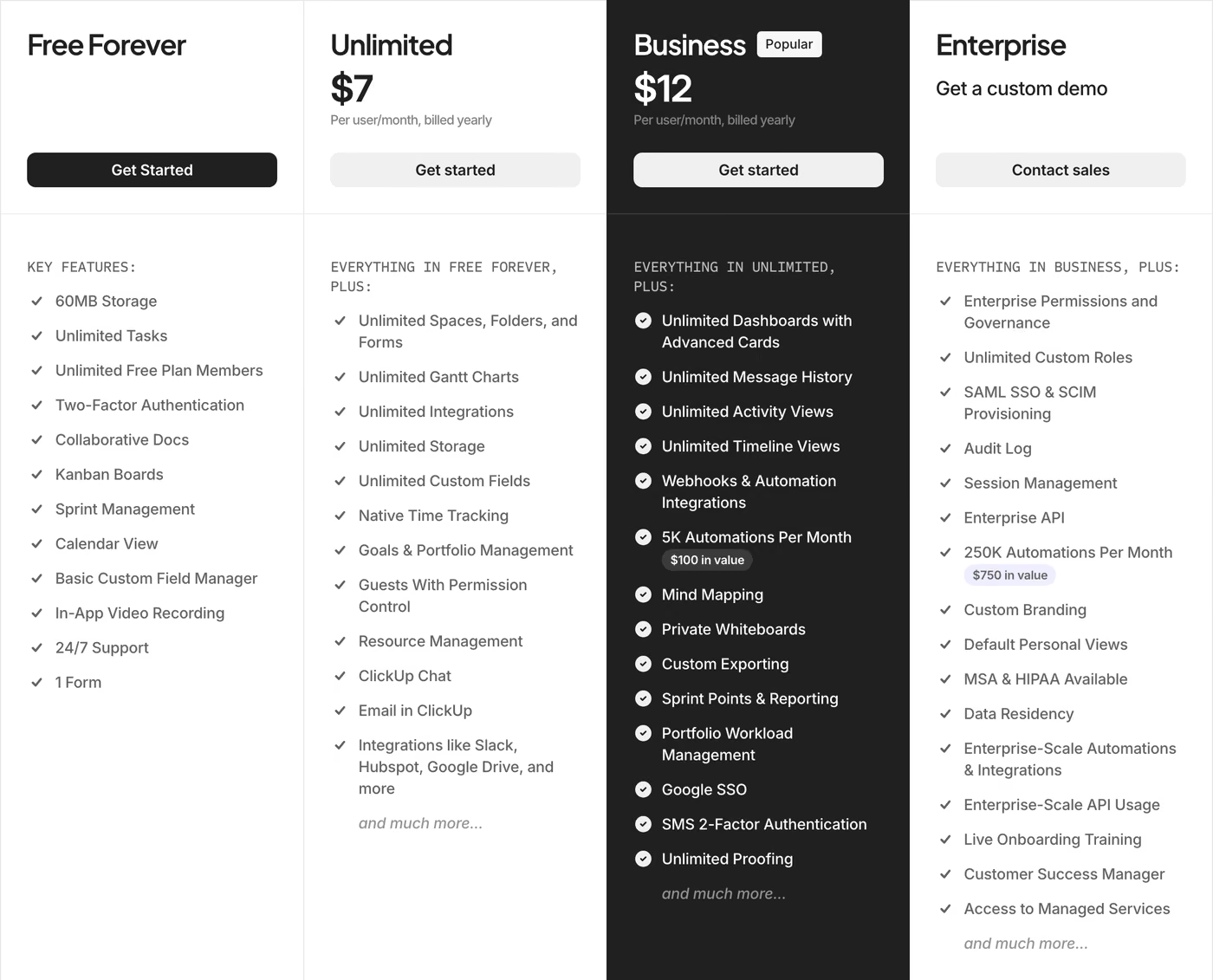
Free Forever is $0. Unlimited is $7 billed yearly, $10 billed monthly. Business is $12 yearly, $19 monthly. Enterprise has no published price and needs a quote. The full plan-by-plan breakdown, with the guest rules and the automation limits, is in the ClickUp pricing guide.
None of those 4 numbers include any AI.
Bill 2: the AI add-on
AI is sold separately, as an add-on you switch on for the Workspace. There are 2 of them.
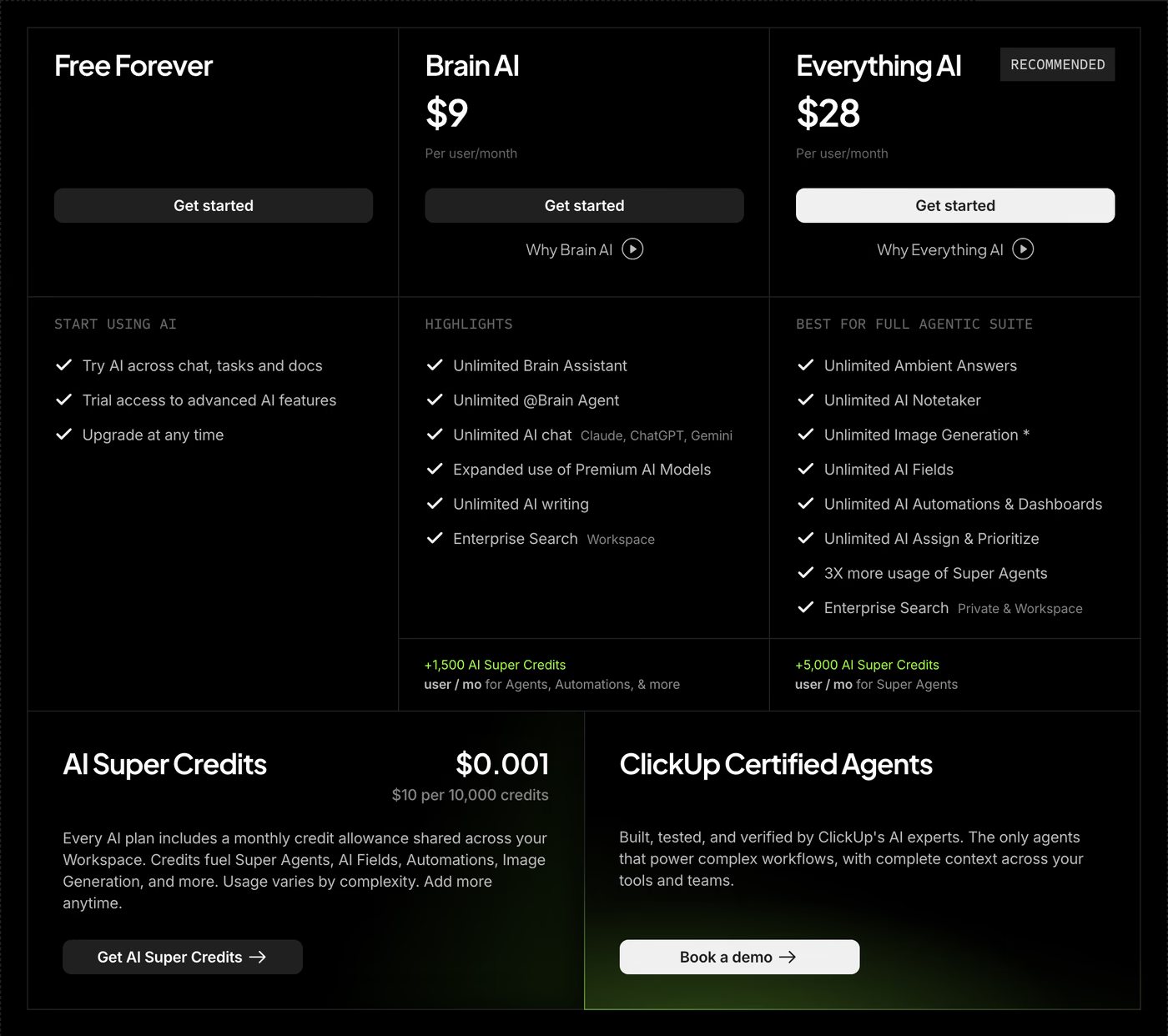
Brain AI, $9 per user per month. Unlimited assistant, unlimited AI chat across Claude, ChatGPT and Gemini, unlimited AI writing, and search across the Workspace. It comes with 1,500 AI Super Credits per user per month.
Everything AI, $28 per user per month. Everything Brain does, plus the AI Notetaker, image generation, AI fields, AI automations and dashboards, and AI assign and prioritise, all listed as unlimited. It comes with 5,000 credits per user per month, which ClickUp describes as being for Super Agents. Both are listed on ClickUp's own pricing page, and what Brain does hour to hour is walked through in the ClickUp Brain guide.
The part that changes the number most
Both add-ons are priced per Workspace member. Everybody with a login gets a seat, and every seat gets billed.
3 people on the team will use Brain every day. The other 22 will open it twice and forget it exists. All 25 get billed.
There is no way around this inside ClickUp. It is the most common complaint about ClickUp AI on Reddit, and it is the single biggest driver of the final number. Team size matters more than which features get ticked.
The Free plan cannot buy AI
ClickUp only sells the 2 AI add-ons on a paid plan. A team on Free Forever that wants Brain is looking at the plan plus the add-on, so $7 plus $9. The real entry price for Brain on a free workspace is $16 a user.
The standalone AI Notetaker is the one exception. That one can be bought on any plan, Free included.
Bill 3: credits
This is where the surprises live, so it is worth going slowly.
2 kinds of AI, and only one of them has a meter
Some AI in ClickUp is free to use once the add-on is paid for. Chatting with Brain, writing, summarising, project updates, web research and searching the Workspace. Use them all day. They never touch credits.
The other kind runs by itself, inside the Workspace, with nobody watching. AI fields, auto-assign, auto-prioritise, AI dashboard cards, image generation, and anything an Agent does. Those have a meter on them, and the meter runs on AI Super Credits.
The rule is simple. A human asking a question is free. A machine doing a job costs credits.
What a credit is worth
A credit costs a tenth of a cent. ClickUp sells them in $10 blocks, so $10 buys 10,000 credits.
Every AI plan comes with a monthly allowance, and the allowance is pooled. A Workspace of 25 people on Brain AI gets 25 times 1,500, so 37,500 credits a month, shared across everybody. One person running a lot of agents spends the whole team's allowance.
What each action costs
Action | Credits | How many for $10 |
|---|---|---|
Fill one AI field | 10 | 1,000 |
Turn a chat message into a task | 10 | 1,000 |
Auto-assign one task | 10 | 1,000 |
Auto-prioritise one task | 10 | 1,000 |
Refresh one AI dashboard card | 20 | 500 |
Generate one image | 100 | 100 |
One Agent run | 100 to 300 | 33 to 100 |
Chat, write, summarise, search | 0 | Unlimited |
An Agent run is one job start to finish. The agent picks up the work, goes through its steps and reports back. The range depends on how many steps it takes. A worked example of 3 agents doing real work sits in the ClickUp AI workload planning guide.
Building an Agent is free. Only running it costs anything.
A worked example
Take that 25-person agency on Business plus Brain AI.
Plan: 25 × $12 = $300 a month
Brain AI: 25 × $9 = $225 a month
Credit allowance: 25 × 1,500 = 37,500 credits a month
Say the agency runs one triage agent on every incoming task, 300 times a month, at 200 credits a run. That is 60,000 credits against an allowance of 37,500.
Short by 22,500. Round up to 3 blocks of 10,000, which is $30 a month.
Total: $555 a month, or $6,660 a year. To run these numbers against a real headcount and volume, use the ClickUp pricing calculator.
Why upgrading for credits costs more
The obvious reaction to running out of credits is to move everyone to Everything AI, which grants 5,000 credits a user against Brain's 1,500.
Run the arithmetic before doing it. The gap between the 2 add-ons is $19 a user a month. At list price, $19 buys 19,000 credits. The upgrade hands over 3,500 extra credits.
Buying credits directly is more than 5 times cheaper per credit than upgrading for them.
Everything AI is worth paying for when the unmetered features are the point: the Notetaker, image generation, AI fields and AI automations with no meter attached. It is an expensive way to buy credits on their own.
Credits do not roll over
The allowance renews every month, and whatever went unspent is gone.
This catches teams on a busy month. Buy a big block in March to cover a launch, and April arrives with the same big block on the invoice, at the same size, until somebody goes in and reduces it by hand.
What happens when they run out
Admins get a warning banner at 80%, 90% and 100% of the allowance.
Just past 100%, the premium AI features stop working until the next renewal. Agents stop running. Fields stop filling.
There is a setting called overage protection that keeps everything running past the limit. It also upgrades the credit pack at the next renewal. So the setting that prevents an interruption is the same setting that raises the bill.
3 more things ClickUp sells
Underneath the 2 add-ons there is a second menu, listed on ClickUp's Brain pricing page.
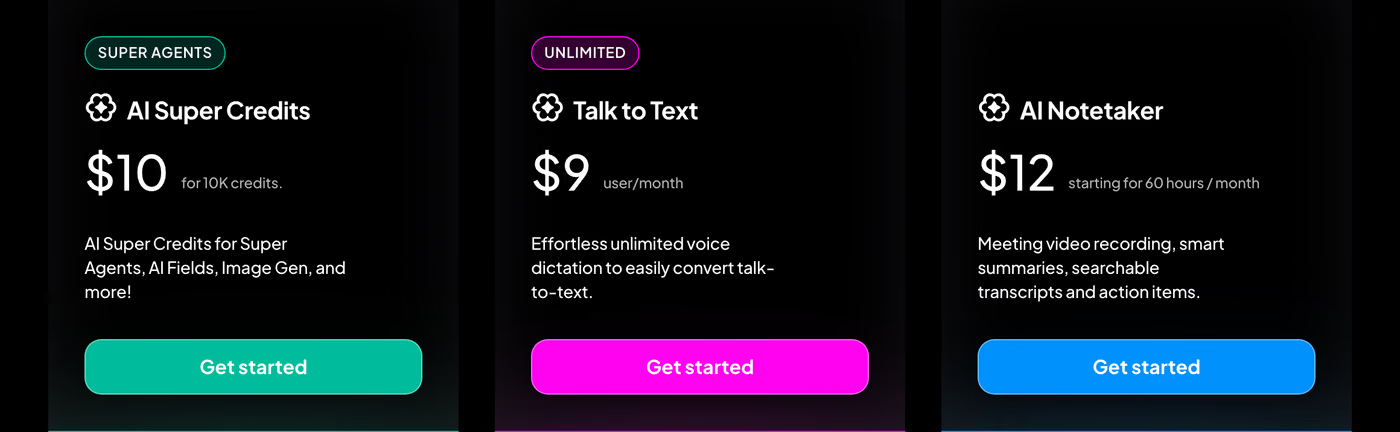
AI Super Credits, $10 for 10,000. Topping up the allowance.
Talk to Text, $9 per user per month. Voice dictation, sold on its own, with its own meter counted in words. A separate line on the invoice from Brain.
AI Notetaker, from $12 a month for 60 hours. Meeting recording, summaries, transcripts and action items. Every workspace gets 5 free hours per admin, shared across the team, and those 5 hours never reset. After that it comes with Everything AI or as this standalone add-on, which works on any plan including Free. Shared and workspace notetakers, and custom bot names, need Business Plus or Enterprise.
The catches worth knowing before signing
The free trial is a one-off
Every workspace gets some AI for free. It is a fixed number of uses that never renews. Spend it and it is gone for good.
Free Forever gets 25 Brain uses for up to 10 people, or 50 above that, plus 500 credits for the whole Workspace. A paid plan without an add-on gets between 50 and 175 Brain uses and 1,000 credits per user.
Spend it deliberately on a real test. Most of it disappears into first-week curiosity.
"Unlimited" is a policy
The unlimited features are unlimited within fair use, and ClickUp's AI terms are explicit about who decides what fair means.
Exceed what ClickUp determines at its sole discretion to be fair, and it may require the purchase of more usage rights, or disable or degrade the AI. The same terms allow ClickUp to add, remove or limit the underlying model providers at any time, and cap total liability for anything AI-related at $100.
That is normal for AI terms in 2026. It is worth reading once before building a process that depends on it.
An annual plan locks the AI in for the year
ClickUp's terms want 30 days' notice before the renewal date for a downgrade, a reduction in user count, or dropping an add-on.
Miss that window and the add-on renews for another 12 months.
The practical advice: buy Everything AI monthly at $28 a head until the volume is known. The annual discount is not worth a year of an add-on nobody uses.
So is ClickUp AI worth buying?
It depends on one question, and it is a question about what the AI is for.
Drafts and summaries. A team already paying for ChatGPT or Claude is buying the same paragraph twice. Brain writes well, and so does the assistant already on the invoice.
Work happening inside the Workspace. AI reading tasks and docs, filling fields, triaging incoming work, running agents on a trigger. A chat window cannot reach into a ClickUp task and write to it. This is what the $9 buys, and it is the reason to buy it.
The honest test: count the automatic actions a month. Under a hundred, the trial covers it and the decision can wait. Over a thousand, the credit maths above matters more than the add-on price.
Questions people ask
How much does ClickUp AI cost? Brain AI is $9 per user per month and Everything AI is $28 per user per month, both on top of a plan at $7 or $12 a user. AI Super Credits cost $0.001 each, sold at $10 per 10,000.
Is AI free in ClickUp? Every workspace gets a one-off trial that never resets. Free Forever gets 25 Brain uses for up to 10 people and 50 above that, plus 500 credits. A paid plan without an add-on gets 50 to 175 uses and 1,000 credits per user. Buying either AI add-on requires a paid plan.
What are ClickUp AI Super Credits? The metering unit for the automatic AI features. One credit costs $0.001. Brain AI includes 1,500 per user per month and Everything AI includes 5,000, pooled across the whole Workspace. An AI field costs 10 credits, an image costs 100, and an Agent run costs 100 to 300. Chatting, writing and searching cost nothing.
Do ClickUp AI credits roll over? No. The allowance renews monthly and anything unspent is lost.
What happens when ClickUp AI credits run out? Admins are warned at 80%, 90% and 100%. Just past 100% the premium AI features stop until the next renewal. Overage protection keeps them running and upgrades the credit pack at the following renewal.
Can ClickUp AI be bought for only part of the team? No. Both add-ons are charged per Workspace member. 25 members means 25 AI seats, used or not.
Can ClickUp AI run on the Free plan? Only the one-off trial, plus the standalone AI Notetaker, which can be bought on any plan. Neither Brain AI nor Everything AI is sold on Free Forever.
Is ClickUp Brain worth it? For AI that writes, a team already paying for ChatGPT or Claude gets the same output twice. For AI that reads tasks, fills fields, triages work and runs agents inside the Workspace, a general assistant cannot do the job and Brain can.
Before buying anything
Take 3 numbers into the decision: headcount, the plan tier, and how many automatic AI actions run in a month. Multiply the first 2 by the add-on price, then check the third against the allowance. The free ClickUp pricing calculator does all 3 sums in the browser and names the cheapest plan that covers what the team needs.
Most teams that overspend on ClickUp are on the right plan with a workspace nobody designed. The AI bill is a symptom of that, and it shows up fastest.
Prices read from ClickUp's own pages on 15 August 2026. ClickUp moves prices and shifts features between plans. Where a figure here disagrees with the checkout screen, ClickUp is right and this page is stale.
Keep reading
How to Design ClickUp Statuses and Workflows
ClickUp Task Management: Create, Plan, and Track Tasks
A step-by-step breakdown of ClickUp task management: how to create tasks, build subtask structures, set dependencies, and track progress across your team.

A Step-by-Step Tutorial on ClickUp-Slack Integration
ClickUp and Slack are powerful project management tools. Integrating them elevates productivity. Learn all you need to know about ClickUp Slack integration